The reverse psychology I used in Failure to Launch: Healthcare IT Q&A is finally starting to work. The question definitions are complete and the commitment phase has begun:

Go over and sign up today.
The reverse psychology I used in Failure to Launch: Healthcare IT Q&A is finally starting to work. The question definitions are complete and the commitment phase has begun:
Go over and sign up today.
It seems like a great concept (to me anyway). Grow a community of like-minded Healthcare IT geeks that want to participate in an on-line Q&A site which rewards contribution and facilitates constructive dialog. As of today, it appears unlikely this will happen anytime soon.

Even after being endorsed on HISTalk News 6/25/10 less than 900 people have visited the site.
The attraction that programmers have for Stack Overflow just doesn't translate for this group of professionals. I suppose it's the nature of the business.
Anyway, it's really too bad there isn't a way for a site like this to gain traction. It would be a valuable HIT resource if it could get off the ground.
About the only thing you can count on in this world, besides taxes and death, is change.
 When we moved from Madison to San Diego in 2005, that was a big change. Of course in Jan/Feb the 70 deg temperature difference makes that decision seem pretty smart. When our 12 y/o golden retriever Miles passed away this past Oct. that change really sucked.
Switching jobs is also a big change. As I've previously discussed, my old company was purchased and I chose not to relocate. As soon as wrote the words "in-the-trenches" I had an inkling that I had probably jinxed myself. Maybe jinxed isn't the right word, but I certainly ended up in a different situation than I had imagined.
Last week I started working as a Health Informatics Architect at ResMed, a global leader in sleep medicine and non-invasive ventilation. Like all medical device companies, ResMed is faced with the daunting challenge of providing the therapeutic data produced by their flow generators to physicians and healthcare organizations.
This position will allow me to continue to develop solutions for medical device interoperability, but at a whole new level. Working with a global team at a world-class company is a very exciting opportunity. I'm looking forward to the challenges ahead.
This change is good!
 Based on the job description, I am a perfect candidate for this position...
As I've previously discussed, my company was sold this past summer. Since then they announced that our operation will be moved to Seattle by the end of the year. SonoSite has been very professional and generous, but I have decided to stay in San Diego.
I made this decision several months ago, but since I will be employed until the end of the year, I have not been very active in my job search. Until now.
So, if you're reading this you may very well be an employer looking to hire someone like me. You might have gotten here from my Stack Overflow Careers CV or even directly from my resume.
There is one question that I can answer up-front:
Q: What are your long-term career goals? More specifically, do you want to do development or do you want to be a software project manager?
A: This is the fork in the career road that most software engineers eventually get to. I've done both and my preference is in-the-trenches software design and development. I get the most enjoyment from building solutions in a collaborative team environment.
Thank you for your consideration.
Sincerely,
Bob

If you're also looking for a job, I wanted to share a little.
About a month ago I came across a "Principal Software Engineer" position that I thought fit my skills and interests pretty well. I submitted my resume and got a full day interview a couple of weeks later. I hadn't done an interview in over four years. Here are some of the highlights:
Even though I was not offered the job, the overall experience was generally good (the rejection part sucked). I think their definition of "Principal" was different than mine.
Every company has different interviewing techniques and practices. It seems that large companies have developed the most rigorous (and onerous) methods. Google is known for its over-the-top questions: 15 Google Interview Questions That Will Make You Feel Stupid. A more pragmatic approach, e.g. How I Hire Programmers, makes sense: "Are they smart? Can they get stuff done? Can you work with them?". I'm not sure many companies can afford to invest that much in interviewees though.
Speaking of "Are they smart?", Jonah Lehrer's article Vince Young talks about the relationship between an IQ test and the performance of NFL quarterbacks. I think the same basic concept applies to developing software products. As important as writing good code is, each engineer must also be able to understand the business needs and really listen to marketing/sales and of course the customer ("emotional intelligence"). There is no IQ test for that. "Genius is one percent inspiration and 99 percent perspiration" (Thomas Edison) also applies.
Interviewing is a two-way street so I would be remiss if I didn't mention The Joel Test: 12 Steps to Better Code. Don't forget to ask good questions.
Anyway...
Just like the rest of the job market these days, the competition for all types of developer positions is also pretty intense. The trick will be finding that perfect match between my skills and the employer needs and environment. We'll see how it goes. Wish me luck!
UPDATE (12/3/09): The Codypo Test, aka 8 Questions To Identify A Lame Programming Job
It's that time of year again. In Oct. 2007 over 1500 homes went up in flames in San Diego. It wasn't close to us then, but now I understand the danger much better.
I left work a little early because of the Packer-Viking game (MNF starts at 5:15 on the West Coast). As I approached our Condo complex I saw smoke bellowing over the roofs. My wife had also just gotten home and we watched with amazement the canyon below going up in flames no more than 25 yards from our patio.

A neighbor had called 911 a few minutes before, but the 15 or so minutes prior to the SDFD arrival was tense. The fire spread amazingly fast. Large shrubs literally exploded into flames. The wind was blowing pretty hard in our direction, but seemed to wane and shift a little, which slowed its progress some.
We collected photos and valuables and got them in the car, ready to escape.
Fortunately, the SDFD came to the rescue in time. A fire helicopter did a couple of water drops, but it was the firefighters that saved the day.

Wow, close call!
I better get back to the second half. Go Pack!
UPDATE: Oh well. Brett and the Vikings will be at Lambeau on Nov. 1. It's a long season...
 Last Tuesday CardioDynamics shareholders approved the deal to be purchased by SonoSite, which was finalized yesterday.
I know that being "absorbed" is a common occurrence in corporate America. But reading about it and going through it are two different things. We're just starting into the transition period. Whether it's good or bad, I think one reason change is so difficult is that it's always a process that you have to work through. Getting used to a new corporate culture will take time and patience.
The harder part of course is that some of the people you have come to know and respect will move on to other opportunities.
When one door closes, another opens; but we often look so long and so regretfully upon the closed door that we do not see the one which has opened for us. [Quote by Alexander Graham Bell]
This is a good thing because they have seen the new open door and will be taking advantage of it. What's good for them is good for me too.
It may be a little weird (maybe not?), but as I've been going through this I periodically have one of these songs going through my head:
"Professional development refers to skills and knowledge attained for both personal development and career advancement. " I'm fortunate in that my personal and career interests are well aligned. I must enjoy my work because I do a lot of the same activities with a majority of my free time (just ask my wife!).
Keeping up with an industry's current technologies and trends is a daunting task. Karl Seguin's post Part of your job should be to learn got me to thinking about the things I do to stay on top of my interests. I never really thought about it much before, but as I started making a list I was surprised by how fast it grew. When it reached a critical mass that I thought it would be worth sharing.
I actually have two professions. I'm a Biomedical Engineer (formal training) and a Software Engineer (self proclaimed). I primarily do software design and development, but being in the medical device industry also requires that I keep abreast of regulatory happenings (the FDA in particular, HIPAA, etc.), quality system issues, and industry standards (e.g. HL7).
Keeping track of Healthcare IT trends is also a big task. With the new emphasis by the federal government on EMR adoption, even a small company like mine has started planning and investing in the future demand for medical device integration.
The other major topic of interest to me is software design and development methodologies. A lot of the good work in this area seems to come from people that are involved in building enterprise class systems. I've discussed the ALT.NET community (here) and still think they are worth following.
So here's my list. I talk about them with respect to my interests (mostly software technologies), but I think they are generally applicable to any profession.
Getting permission from your manager to investigate new technologies that could potentially be used by your company is win-win. In particular, if you can parlay your new-found skills into a product that makes money (for the company, of course), then it's WIN-WIN.
In case you've never heard this phrase: Skunk works.
I always seem to be working with a new software development tool or trying to learn a new programming language. Even if you don't become an expert at them, I think hands-on exposure to other technologies and techniques is invaluable. It gives you new perspectives on the things that you are an expert in.
Besides getting involved in an open source project, people have many interesting hobby projects. See Do you have a hobby development project? for some examples.
I currently follow about 40 feeds on a variety of topics. I try to remove 2-3 feeds and replace them with new ones at least once a month. Here is my Google Reader trend for the last 30 days:
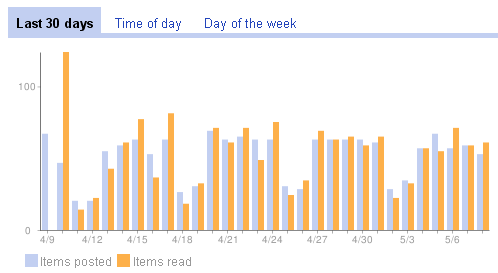 You can see I'm pretty consistent. That's 1605 posts in 30 days, or about 53 posts per day. To some, this may seem like a lot. To others, I'm a wimp. During the week I usually read them over lunch or in the evening.
Google Alerts is a good way to keep track of topics and companies of interest. You get e-mail updates with news and blog entries that match any search term. For general search terms use 'once a day' and for companies use 'as-it-happens'.
I joined Twitter over a month ago. The 30 or so people I follow seem to have the same interests as I do. What's more important is that they point me to topics and reference sites that I would not have discovered otherwise. I've dropped a few people that were overly verbose or had mostly inane (like "I'm going to walk the dog now.") tweets.
I'm also a member of LinkedIn. Besides connecting with people you know there are numerous groups you can join and track topical discussions. Unfortunately, there are quite a few recruiters on LinkedIn which somewhat diminishes the experience for me.
I don't have a Facebook account because my kids told me you have to be under 30 to join. Is that true? 🙂
I browse the computer section of the bookstore on a regular basis. I even buy a technical book every now and then.
Downloading free Kindle e-books is another good source (and free, of course) e.g. here are a couple though Karl's post: Foundations of Programming. There's a lot of on-line technical reading material around. Having a variety on the Kindle allows me to read them whenever the mood strikes me. One caution though: the Amazon conversion from PDF and HTML to e-book format is usually not very good. This is particularly true for images and code. But still, it's free -- you get what you pay for.
There are numerous technical print publications around, but they are becoming rare because of the ease of on-line alternatives. I used to get Dr. Dobbs journal but they no longer publish a print version, but it is still available electronically though.
I miss that great feeling of cracking open a fresh nerd magazine. I still remember the pre-Internet days when I had stacks of BYTE laying around the house.
These tend to be company sponsored, but the content about a product or service that you may not know a lot about is a good way to learn a new subject. You just have to filter out the sales pitch. You typically get an e-mail invitation for these directly from a vendor.
I've talked about this before (at the end of the post). In addition to software SIGs, look into other groups as well. For me, IEEE has a number of interesting lectures in the area.
Face to face networking with like professionals is very important for career development ("It's not what you know -- it's who you know" may be a cliche, but it’s true.). Go and participate as much as possible.
If there's not a user group in your area that covers your interests, then start your own! For example: Starting a User Group, Entry #1 (first entry of 4).
Press your employer for travel and expenses, and go when you can. This is another win-win for both of you. Like Webinars, vendor sponsored one day or half day seminars can be valuable. Also, as in #9, this is another opportunity to network.
Just getting out of the office every now and then is a good thing.
These may be good for some people, but I rarely listen to podcasts. My experience is that the signal to noise ratio is very low (well below 1). You have to listen to nonsense for long periods of time before you get anything worthwhile. But that's just me. Maybe I don't listen to the right ones?
CodeProject and Stack Overflow are my favorites. Also, if you do a search at Google Groups you can find people talking about every conceivable subject.
Asking good questions and providing your expertise for answers is a great way to show your professionalism.
IMO your single most important professional skill is writing. Having a blog that you consistently update with material that interests you is a great way to improve your writing skills. It forces you to organize your thoughts and attempt to make them comprehensible (and interesting) to others.
If you have a University or College nearby, they probably have an Extension system that provide classes. Also, there are free on-line courses available. e.g.: Stanford, MIT, and U. of Wash.
UPDATE (6/23/09): Here's some more fuel for #13: The benefits of technical blogging. All good points.
——
CodeProject Note: This is not a technical article but I decided to add the 'CodeProject' tag anyway. I thought the content might be of general interest to CPians even though there's no code here.
I'm finally all atwitter. Better late than never. Use the link on the lower right or click here:

It seems like it will be a good place for quick thoughts, links, and discussion.
 I'm a big reader. When my family told me that they ordered a Kindle for me I was pretty excited. Well, that was over two months ago. We were notified a couple of weeks ago they would be shipping a Kindle 2. It finally arrived!
The Kindle 2 hardware has a modern sleek look and feels great in your hands. At 10.2 ounces it's lighter than most of the books I read.
Here are the things I like:
Here are the things that I've found annoying:
The text-to-speech feature seems the work -- the voice isn't very natural though and would get on my nerves quickly. But that's OK because I don't plan on using this feature.
IMHO, the benefits of electronic book reading and content management far outweigh the annoyances of the Kindle. You're not going to be browsing the Web or typing e-mails with this device. The Kindle is for reading books! If you expect more than that you should consider purchasing a different device.
UPDATE (3/2/09): Here's a thorough review of reading newspapers on the Kindle 2: Reading the New York Times on Kindle 2.
The annual Year in Ideas New York Times Magazine issue is one of my favorites. Of the 58 ideas, only two are biomedical related:
Automated Anesthesia (McSleepy)
The Biomechanical Energy Harvester
There are also a couple of other medical ideas, but all are worth looking through.
The only software/high-tech gadget idea is an iPhone application: Bubble Wrap That Never Ends ("Infinite Pop Pop").
IMO the strangest of the lot is Carbon Penance which takes personal responsibility for climate change to a new level:
When it detects, via a special power monitor, that electric current levels have exceeded a certain threshold, the wireless device slowly drives six stainless-steel thorns into the flesh of your leg. “It’s therapy for environmental guilt,”...
No thanks!
